Monday, 1 January 2024

Blender School - a lesson that has taken me 10 years to learn

 I decided to complete the final lessons so I could move on to the main paid-for Accelerator course.

It's all basic stuff. I'm watching, but I can't be bothered to follow step-by-step as I'm not learning anything. Then Ryuu does something that I didn't think was possible. This is something I've wanted to be able to do since the very first time I started using Blender.

So here's the trick:


1. Apply a material to part of your model.

2. Invert your selection: Ctrl+I


3. Shift+Click on the component on which you just applied a material. Click on the material options down Chevron. Select Copy Material to Selected.


4. BOOM! Oh, how much time would I have saved if I'd known this in 2014?!


Right, I'll carry on with the lesson now.

Blender School: Modelling complete

 I caught up with my Blender Bros training course, completing steps six and seven, which finish off the modelling. These last two lessons really just reinforce what I learned in the previous lessons. Good to reinforce!

I think the biggest benefit was further fixing steps. We Boolean a cable pipe into the central components curve, which produces an unholy mess in the geometry. We then dive in with our Machin3tools and get those vertices aligned/merged/dissolved. I love how symmetrize lets you complete work on one side of a mesh and then apply the changes to the other side.  

Naturally, I went off the rails a few times, but nothing where I was left phased. I made a few changes to Ryuu's design, just where I felt I wanted to go in a slightly different direction. 

Step-6 Pipe details

Step-7 Claw and grill

The next lesson will cover materials. There's plenty for me to learn there!

More Terrain

I just can't stop playing with True-Terrain 5.

Big but simple terrain - a desert

Small but detailed terrain - pretty flowers


Saturday, 30 December 2023

More "Oh crap", then "ha ha"

 Lesson 5. We're building the crane's forward arm section. Adding lots of Boolean goodness to make the pieces look more engineered and less heavy.

Once again, I get into trouble. A lot of trouble. I spend an hour on a half an hour lesson. I feel shame, like I'm in one of those practical assessments in A-level physics where I'm in a panic and convinced that everyone else is way ahead of me and have no problems. I feel my confidence sapping away, along with my enthusiasm. Then something happens. The lesson devolves into a series of fixes and troubleshooting. I'm fixing my problems while Riuu fixes his own. Mesh problems are inevitable. You need to recognise and understand them and then understand what tools you use to fix them.

I feel much better because I realise that a lot of my problems have been a lack of fluency concerning mesh problems. I'd either ignore them or, very often, especially when using the Fluent addon, restart the build, wasting a lot of time and energy.

New tools I must not ignore.

A few times, I found myself regressing to default tools. This was a case where Riuu used LoopTools to bridge two insets in the arm component. I've often bridged edges, but this seemed more direct. For my own reference, here is the LoopTools user documentation.

Lots and lots of bad geometry -- mostly fixed.


I ended the lesson pretty happy. The model looks pretty cool. Riuu has a great design sense. He spotted an element of his design that didn't flow properly and made an adjustment part of the lesson.


More Terrains

I took a break by going back to True-Terrain 5. I've made some progress with terrain materials.


Small terrains let you scatter like mad

Flowers!


Friday, 29 December 2023

An "Oh Crap!" Blender Lesson

Part four of the Blender Bros Hard Surface Modelling Jumpstart course should have felt like running on wheels, but it was a complete mess. I'd made some subtle errors in earlier lessons that resulted in some badly broken geometry. The symmetrize operation had created hidden extra edges that stopped bevel operations from working. I had to reset the lesson and do some extra corrective steps to remove and rebuild the component I'd built in the previous lesson.


I cut a few corners and made some alterations to Riuu's design, not really to make improvements. We got there in the end, but a fifteen-minute lesson took thirty minutes to complete.

All said, having extra problems meant learning more as I struggled to get back on track. It's all good, as I found my way to the end.

I don't really have any new knowledge to record. Maybe the creation of new elements by selecting and separating parts from an existing mesh. I haven't done that enough!

It is as follows:

1. Select an element.

2. Shift+D to duplicate.

3. Then, this part is different for me as "P" doesn't let me separate. Instead, I right-click and choose "Separate". I wonder if this is another change you get from having Hard Ops installed?


I was going to try to finish this free course today so I could jump into the full Accelerator course. This lesson was a spanner. I'm going to slow it down. If the next lesson goes wrong I might restart the course and pay more attention so as not to carry over errors.


Thursday, 28 December 2023

Land ahoy!

 Busy day taking my youngest to a birthday party. I had a little time this evening to build a couple of heightmaps in World Creator and have a play with it in True-Terrain 5.

Scatter madness!

This took some configuring. I had not tracked the impact of the scatters. As a result, this was originally going to include millions upon millions of scattered objects. Naturally, it took an hour to compile the scene, then suffered an out-of-memory error.

After the rains

I need to create a whole scene, not just scenery. I've been thinking of doing a scene featuring crashed cargo canisters and thousands of tins of space beans. Watch this space!


Wednesday, 27 December 2023

Another "HOLY CRAP!?" Lesson at Blender School

 
The course model really starts to take shape.


In this lesson, we built the crane's body. I went wrong again in various steps. Although I'm learning a lot of basic stuff, I'm not a noob; I was able to work my way out of each problem.

Geometry repair


This lesson included steps that use the MACHIN3tools Smart Vert tool. You suddenly realise why the trainer, Ponte Ryuurui, insisted that we install and use this addon even though the course is supposed to be limited to the vanilla Blender toolset. 

So we've applied various Boolean operations and chamfers, and even when being very careful not to collide operations, you'll occasionally break your geometry's flow.

We checked the edge of the component to find where edges didn't flow.  We'd select vertices that should be joined and press "1" to connect them or "Ctrl+1" to join them at the centre.


"1" to join one to the other. "Ctrl+1" to move both verts to a centre and then join them.

Another Holy S**t moment

Symmetrize is a tool that I had never used. I had the mirror tool. Why would I need to symmetrize a mesh?! Well, the Symmetrize tool applies a mirror operation for the specific purpose of making a mesh symmetrical along an arbitrary axis. The mirror tool can produce the effect of the Symmertrize tool, but you need more configuration. Symmetrize is more direct. It's applied directly to your mesh as a destructive operation, while Mirror is a modifier effect that isn't destructive unless you apply it.

The moment of truth that I had absolutely massive holes in my basic Blender modelling knowledge.

Tuesday, 26 December 2023

Boxing day


I had twenty minutes to play before going to see family. 


Just playing. I added a volume to catch the rays, but it needed tweaking.

Very annoyed

I got an email from the Blender Bros at 11pm. I made a note to check up on it first thing in the morning as I was having an early night. In the morning, I read that their 40% discount on the Hard Surface Modelling Accelerator course was ending in 6 hours.

Who gives just six hours warning for the end of an online promotion. You're always going to catch potential customers sleeping through the night. I wanted to finish the free course before making a final decision, but to be honest, I'd already decided that I'd buy the course.

I thought that the course was probably worth the full price and that I'd end up buying it at some point.

Less annoyed

I was on the way to visit my sister and her family, staying at a rental property close to us. I checked Facebook and saw the ad for the discounted course. Was it back, or was it an error? I followed the link and it was going to let me buy at the discounted rate, so I did. Was the temporary end of the promotion a mistake or a sneaking sales tactic? I don't know, but I'm glad to have the expanded course.

I've decided that once the Accelerator course is complete, I'll probably buy their introduction to Hard Ops and Box Cutter.

Saturday, 23 December 2023

Blender School: Weighted Normals

 Something that came up during the Blender Bros course that I'm doing is the use of a weighted normals modifier. I'd completely forgotten that this was a thing. This morning, I woke up with an urge to understand what exactly it is doing and why.

So, I remembered learning about it during an earlier course that I didn't complete:


I'd watched this video before, on the week that Creative Shrimp's Hard Surface Modelling course was released in 2018.

When you assign weighted normals, the size of a face impacts how shading is applied to edges. When normals are averaged, they can result in a weird, edgeless effect or related artefacts that you often get when there is insufficient geometry to tell the shader how it should handle particular edges.


Blender School: A base for the legs

 Well, that was like having my teeth pulled out. I got into a right old mess. It's probably down to me incorrectly ordering and or managing the parenting on the leg and then the leg's instanced copies. Most of the modelling operations were done okay. Just variants of the first part. 


Some key things:


Building up logical collections with "M" works well and makes complete sense. I've always done a "clean up" session after modelling "in the flow", choosing to not do any housework while actually modelling just builds up work for later. I will see if I can become more organised in making collections while modelling.

Copying mesh elements is also something I didn't do. Taking a few faces, Shift+D to make a copy, then separating, then using the new element to create a referenced component. 

It's unlikely that I'll be able to do the next lesson for a while as it's Christmas!!


Blender school: a leg thing

 This Blender Bros course runs through the modelling of a futuristic crane. Component one is a support leg.

Support Leg - part 1 of the Blender Bros Free Solid modelling course

 In truth, I could have modelled this part with my eyes closed. However, I wouldn't have used booleans quite so effectively. I wouldn't have used the bevel and then used some deeper functionality to split the bevel operation. So modelling job one was well worthwhile. In fact, I might need to repeat the steps to really get my head around some of the later steps. 

More things

More natural-looking terrain textures. This took a while, and it still needs some improvements in terms of "bush and shrub noise". It is much improved from my earlier efforts. 


I challenged myself to only use one texture, so all variations in this terrain come from filtering, scaling and masking. 
One texture to rule them all

The challenge of big noise


This effort helped to clarify an important requirement for terrain texturing. Terrains of any reasonable size have large-scale noise, not just the shift of textures that you expect to see from cliffs, rocky outcroppings and scree banks. There are countless mechanisms at work: seepage and sediment build-up, the effects of wind and moisture, and so many more. True-Terrain 5 has some really powerful tools for masking and noise-making, but you really need to work hard to ensure that these tools produce natural-looking results that create the illusion that these natural mechanisms have been at work.

Friday, 22 December 2023

Back to school. Blender Bros free Solid Modelling Course


Back to Blender School

So I'm 10 years in. I should be a Blender expert. Instead, I'm a veteran who stopped learning and hobbled around the workflows with a small number of learned workflows for years and years.

This changes! It's a resolution for the new year that I'm starting on early. I'm going to try to maintain detailed notes of key lessons here in this very blog.

I'm setting myself a challenge that by the end of January, I will have completed two major Blender courses. Yesterday, I started the Blender Bros Hard Surface Modelling free jumpstart course. This is not a major course, but it's a good taster before investing in their heavily discounted Accelerator course.


Having completed the introduction to the introductory course, here are some things I've rediscovered:


MACHIN3tools

MACHIN3's free toolset for streamlining the most basic Blender operations. I already had this and installed it, but I ended up not using and removing it. I didn't use Blender regularly and only used MACHIN3tools for a short time. As a result, muscle memory kicks in, and the changes this addon makes cause confusion.


Tab change:

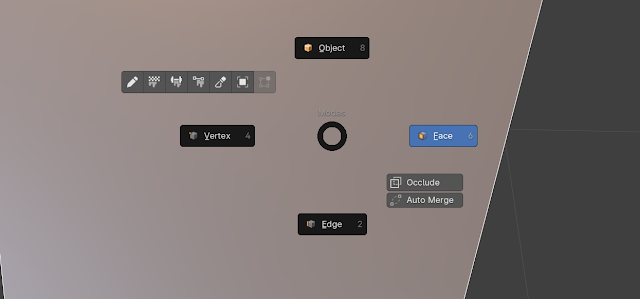
The tab key is the most fundamental step in Blender modelling. It switches you from Object mode to Edit mode. Once you are in Edit mode, you then select a context: Vertices/Edges/Faces.

With MACHIN3tools, this changes to a pie menu. Now, going into the menu, you select an Edit mode context, or if you are in an Edit mode context, you can select Object mode.

Tab select, Edit mode context select.

In an edit mode context, leave by selecting Object.


The first few times, this has already caused my brain to hurt. It's a significant change, but once you get it stored in your muscle memory, it means fewer clicks for things you do all the time. Previously, I didn't use it enough, so it tripped me up every time I used Blender.


Local mode

How the hell did I forget about local mode?! This takes you into the thing you are working on, hiding other stuff in the viewport.

Keyboard: "/" key.

I'd been using the hide command to isolate a target mesh. This is simpler. Firstly, this is a toggle. Hide needs a separate unhide control. Unhide, in its main use, unhides everything, including things unrelated to where you are working.

Next up.... a lesson about making a leg thing.


Orbital Elements: Medium Rig #2

Where's the Blender work? This is a Blender blog! That's coming; it's good I recognise it's too soon to start building becau...